
Download FileTypesMan – file type associations, manage file types, edit file type settings, add new file associations, file management tool, Windows utility
Overview
FileTypesMan is a specialized utility application developed by NCH Software, designed to give users granular control over file type associations on Windows systems. The app functions as a file management tool that enables users to view, modify, and organize how specific file extensions are linked to associated programs. This is particularly valuable for individuals who encounter issues with incorrect default applications opening certain files, or those who wish to streamline their workflow by customizing file handling across multiple software platforms.
Target users include both casual computer users and advanced individuals managing complex file environments. For example, a graphic designer might use FileTypesMan to ensure that all .PSD files open in Adobe Photoshop by default, while a developer may adjust .JSON or .XML file associations to align with preferred text editors. The tool is especially useful after software installations or system updates that inadvertently alter file associations.
As a free application, FileTypesMan contributes meaningfully to the Windows productivity ecosystem by offering a lightweight, focused solution to a common user pain point. It does not replace built-in system tools but enhances them with a more comprehensive interface. The developer did not provide additional technical details about the app’s architecture or integration with Windows components.
Key Features & Functionality
FileTypesMan delivers a suite of practical tools tailored to file association management, each designed to improve user control and system efficiency.
- Manage File Associations: Users can view a complete list of file extensions and their associated programs. This feature allows for quick identification of which applications are linked to specific file types, making troubleshooting and optimization straightforward.
- Edit File Type Settings: The app enables users to change default programs for any file extension. This is helpful when an application incorrectly sets itself as the default handler, or when users prefer a different software for the same file type.
- Add New Associations: FileTypesMan allows users to create new file type associations, even for files without existing handlers. This ensures that orphaned or unrecognized file types can be linked to appropriate programs, improving workflow continuity.
- User-Friendly Interface: Despite its technical nature, the app features a clean and intuitive layout. Navigation is consistent, with clear labeling and logical grouping, allowing users of all experience levels to operate the tool effectively.
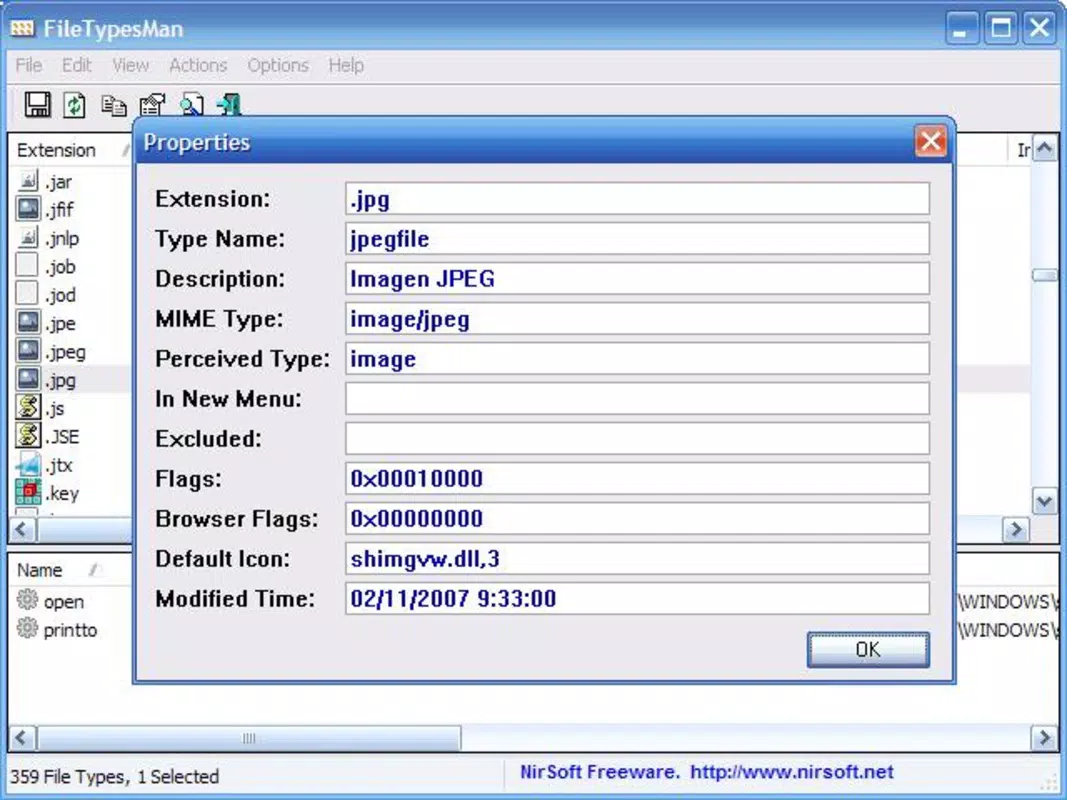
- Comprehensive Information Display: Each file type entry includes metadata such as the program path, description, and icon. This transparency helps users make informed decisions about file handling and system behavior.
For instance, a user who frequently works with .PDF files can use the tool to set Adobe Acrobat as the default program across all instances. Similarly, a home user struggling with .MP3 files opening in an unexpected media player can correct the association in seconds.
Interface, UX & Performance
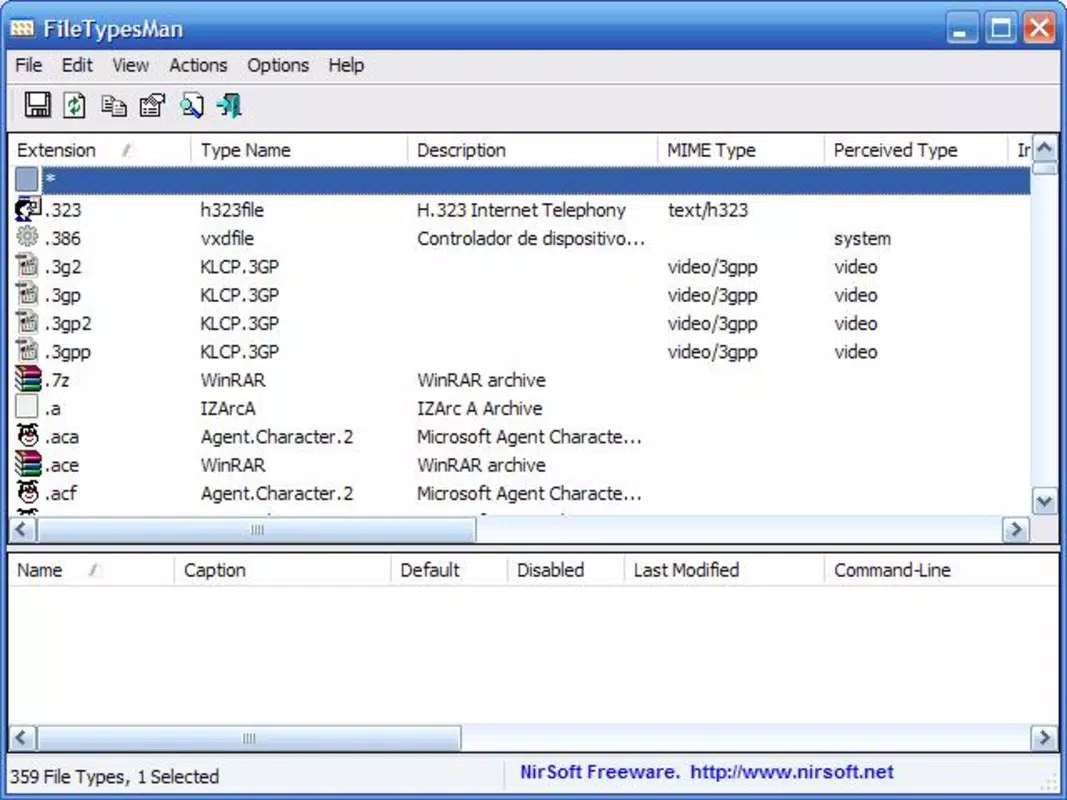
FileTypesMan presents a straightforward, no-frills interface optimized for functionality over visual flair. The layout is organized into a two-pane view: one side lists all registered file extensions, while the other displays detailed properties of the selected file type. This structure supports efficient navigation and reduces cognitive load.
Navigation is linear and predictable, with consistent menu placement and minimal onboarding. Users can filter file types by extension, program name, or status, enhancing usability for those managing large numbers of file associations. The app responds promptly to user inputs, with minimal lag during operations such as editing or adding associations.
Although the developer did not list formal performance metrics, the application’s lightweight size of 2.8 MB suggests efficient resource usage. It is designed to run in the background without impacting system performance. The app maintains stability across various Windows configurations, though specific compatibility details were not disclosed.
Platform Compatibility & Technical Requirements
FileTypesMan is exclusively available for the Windows platform. It is compatible with current and widely used versions of Windows, though the developer did not specify minimum OS requirements. The application has a file size of 2.8 MB, making it ideal for systems with limited storage capacity.
Users can download and install the app without requiring administrative privileges in most cases. The latest version, 2.0, was released on September 8, 2023. No additional dependencies or third-party software are required for operation.
Pros and Cons
Pros
- Free to download and use with no hidden costs
- Lightweight design at just 2.8 MB
- Simple, intuitive interface suitable for non-technical users
- Comprehensive control over file type associations
- Supports editing, adding, and viewing file associations efficiently
Cons
- Platform is limited to Windows only
- Developer did not provide detailed system requirements
- No mobile or cross-platform availability
- Functionality is limited to file associations, not broader file management
- Updates may not be frequent, as no release cycle was specified
FAQ
Is FileTypesMan safe to download and install?
Yes, FileTypesMan is a free utility developed by NCH Software, a reputable provider of productivity tools. It does not contain malware or adware, and its lightweight size reduces security risks.
Can I use FileTypesMan on older versions of Windows?
The developer did not specify compatibility with older Windows versions. While the app may function on legacy systems, this has not been confirmed.
Do I need administrator rights to install FileTypesMan?
Installation typically does not require elevated privileges, but some file association changes may require admin rights to apply system-wide.
Is FileTypesMan available for Android or iOS?
No, the app is currently only available for Windows. There is no official version for mobile platforms.
How often is FileTypesMan updated?
The latest version, 2.0, was released on September 8, 2023. The update frequency is not publicly documented by the developer.
Final Thoughts
FileTypesMan stands out as a focused, reliable utility for users seeking precise control over file type associations on Windows. Its free model, compact size, and intuitive interface make it accessible to a wide audience. Whether you're a professional managing complex workflows or a home user frustrated by misbehaving file opens, this tool delivers tangible value without unnecessary complexity.
For those who value efficiency and system customization, FileTypesMan offers a powerful yet simple solution. It fills a niche gap in Windows’ built-in file management, providing a streamlined way to maintain consistency across file types. While it lacks mobile support and advanced features beyond associations, its core purpose is executed with precision.
Download FileTypesMan now to take full control of your file management experience.


